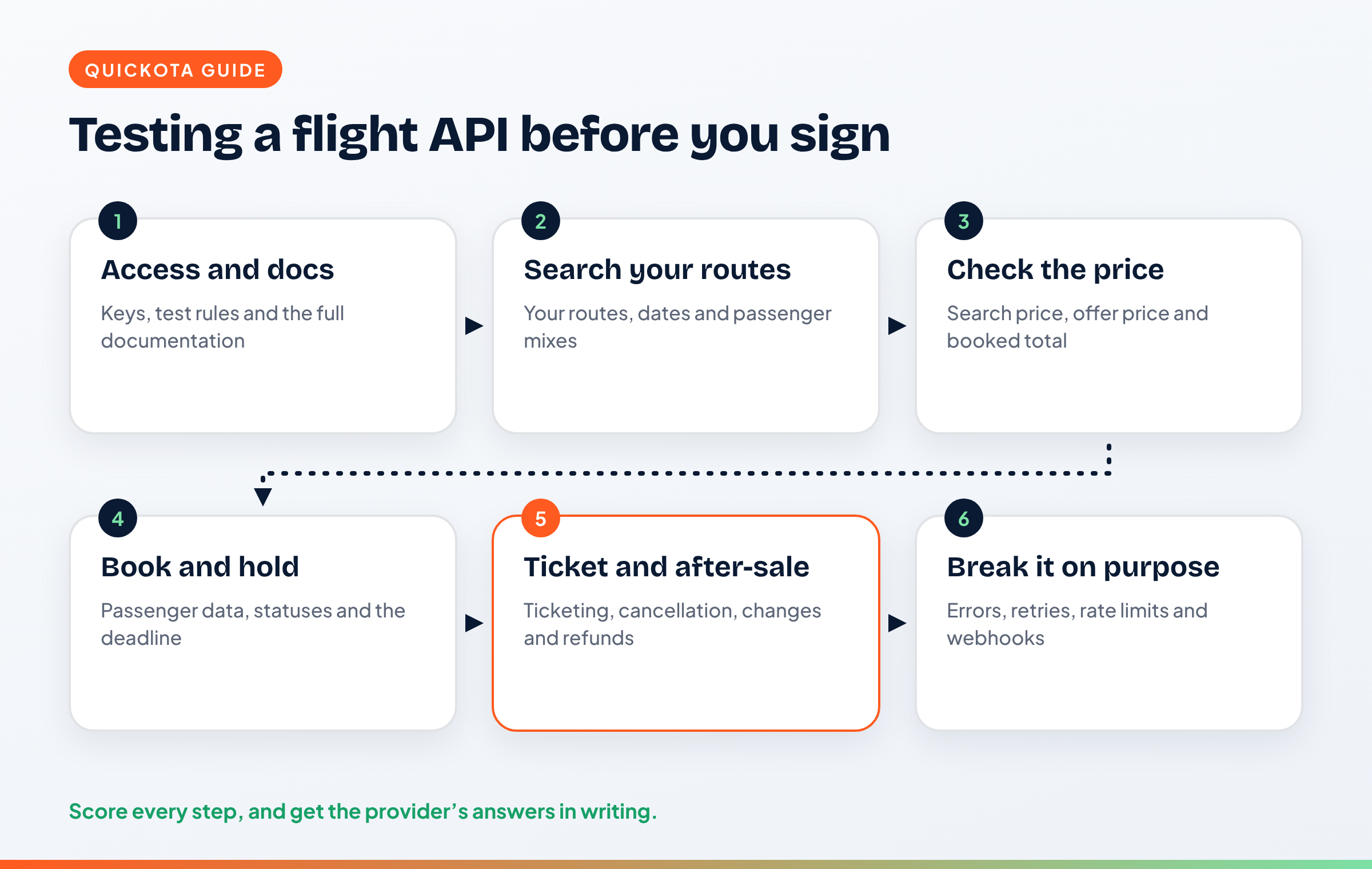
Short answer: Test a flight booking API the way your customers will use it. Run real routes through search, check that the price holds from search to booking, walk a booking through hold, ticketing and cancellation, and then break things on purpose: time-outs, retries, expired offers and schedule changes. Score each step, write down what failed, and get the provider's answers in writing before you sign.
This guide is for CTOs, lead developers and founders at travel agencies and online travel startups who are comparing flight booking APIs. It gives you a test plan you can run in one or two weeks. For the commercial questions to ask first, read Flight Booking API for Travel Startups: What to Ask Before You Integrate.
Key takeaways
- Test with your own routes, dates and passenger mixes, not the provider's demo searches.
- Price accuracy matters more than search speed: compare the search price, the offer price and the booked price.
- Walk the full booking flow, including the ticketing deadline, cancellation and after-sale requests.
- Break things on purpose: time-outs, duplicate requests, expired offers and invalid passenger data.
- Score the documentation and the support response as part of the test, not as an afterthought.
Why test a flight API before you sign?
You test a flight API before you sign because integration is the expensive part. Once your developers have built search, booking and after-sale around one provider, switching costs weeks of work. A short, structured test shows whether the content, prices and booking flow match what your customers need, while changing your mind is still cheap.
Demos are built to look good. They use routes that work, dates with plenty of seats and simple passenger mixes. Your customers will search last-minute flights, family bookings with infants and routes with connections. The test has to look like their searches, not the demo.
What do you need before you start testing?
Before you test, you need access to the provider's documentation, an API key or test credentials, and a clear statement of what the test environment is. Ask whether test bookings reach real airlines, whether tickets issued in the test are real, and whether test bookings cost anything. Write the answers down; they change how you run every step below.
Prepare three things on your side:
- A route list. 20 to 30 routes your customers actually buy, from your sales history or enquiries. Include short-haul, long-haul, connections and at least one route you sell in peak season.
- A passenger mix list. One adult; two adults and two children; an adult with an infant; a group of nine.
- A score sheet. One row per test, with columns for result, time, notes and a pass or fail.
How do you test flight search and availability?
Test search by running your own route list across several dates and passenger mixes, then checking three things: whether the flights you expect appear, whether the results are complete (baggage, fare family, connections, operating carrier), and how long each search takes. Compare a sample of results with the airlines' own websites on the same day.
What to record for each search:
- Coverage: did the carriers you sell on this route appear? Note missing airlines and missing low-cost carriers.
- Completeness: does each result show checked baggage, the fare family or brand, the number of stops and connection times?
- Passenger types: do child and infant fares price correctly, or do they fail or return adult fares?
- Speed: time each search. Note the slow ones, not only the average, because your customers see the slow ones.
- Empty results: when there are no flights, does the API say so clearly, or return an error?
Do not judge a provider on one day. Run the same searches on two or three days, including a weekday morning and a weekend.
How do you check that prices are accurate?
Check price accuracy by following the same fare through every step: the price in search, the price after the offer-price (re-pricing) call, and the price on the booking. Record each one. Small changes happen, because fares move, but you need to know how often they change, by how much, and whether the API tells you clearly when they do.
A simple price test:
- Search a route and pick five results.
- Call the offer-price step for each one straight away, then again after ten minutes and after an hour.
- Book one or two of them (in the test environment if you have one) and compare the booked total with the offer price.
- Check that taxes, fees and the total add up, and that the currency is what you asked for.
Illustrative example: if a search shows a total of 400 and the offer price returns 420, your website must show the new price and ask the traveller to confirm before booking. If the API changes the price without a clear signal, your support team will hear about it from angry customers.
Also read the fare rules that the API returns for the same fares. Change and refund conditions should be readable by your team, not only by machines. Our guide to airline fare rules explains what to look for.
How do you test the booking and ticketing flow?
Test the booking flow from passenger details to e-ticket: create a booking, read back the booking record, check the ticketing deadline, issue the ticket (or check how ticketing works in the test), retrieve the e-ticket and cancel a held booking. Each step should return a clear status, and the booking should look the same when you retrieve it later.
Points to check:
- Passenger data rules: names with spaces, hyphens and long surnames; dates of birth for children and infants; passport fields where the route needs them.
- Holds and deadlines: does the booking show a ticketing time limit? What happens to an unticketed booking after the deadline? Our guide to PNR, hold and ticketing explains these terms.
- Payment: how is the booking paid for: a prepaid balance, a deposit or credit? What happens if the balance is too low at ticketing?
- Statuses: are booking and ticket statuses clear and documented, or do you have to guess from free text?
- Cancellation: can you cancel a held booking through the API, and does the status update straight away?
How do you test after-sale: changes, refunds and schedule changes?
Test after-sale by asking how each request type works through the API: cancellations, refunds, date changes, name corrections and airline schedule changes. After-sale is where most integrations fall short. If a request type needs an email to the provider, plan who in your team handles it and how the booking status is updated afterwards.
For each request type, record:
- whether it is available through the API, the panel or only by email;
- how the result comes back (a status you poll, or a webhook);
- whether there is a fee, and where it is shown.
Schedule changes deserve their own test. Ask the provider to show you what a schedule change looks like in the API and how your system is told about it. Our guide to flight changes and refunds on a B2B platform covers the business side.
How do you test errors, retries and webhooks?
Test errors by making requests fail on purpose and checking that the API answers clearly. Send invalid data, book an expired offer, repeat a booking request after a time-out and exceed the rate limit. A good API returns a documented error code for each case and never creates a duplicate booking when a request is retried correctly.
Tests to run:
- Invalid input: wrong date formats, missing passenger fields, unknown airport codes. Each should return a clear, documented error.
- Expired offer: wait until an offer expires, then try to book it.
- Retries: simulate a time-out on a booking request and retry it. Check whether the API supports idempotency, so a retry with the same key returns the first result instead of a second booking.
- Rate limits: check the documented limits and what response you get when you pass them. Ask about look-to-book rules: how many searches per booking the provider expects.
- Webhooks: if the API sends webhooks, check that they are signed, that they are retried when your server is down, and that you can tell which booking each one belongs to.
How do you score documentation and support?
Score documentation by giving a developer a task (for example, "book one adult on a connecting flight") and timing how long it takes using only the docs. Then send the provider two technical questions and record how fast and how clearly they answer. Slow answers during a sales process rarely get faster after you sign.
Good signs:
- an OpenAPI file you can import into your tools;
- an error reference with every code explained;
- a changelog that announces changes before they happen;
- clear rules for authentication, keys, rate limits, idempotency and webhooks.
How to test the QuickOTA flight booking API
The QuickOTA flight booking API is a REST API for flights: search, offer price, fare rules, booking, ticketing, cancelling held bookings, retrieving bookings, e-tickets, post-booking requests, schedule changes and your account balance. Your developers can review everything in this guide in the developer portal at quickota.com/developers before you talk to us.
What your developers can check in the docs:
- API keys with scopes, IP allow-list, expiry, rotation and revocation.
- Webhooks with secret rotation and retries.
- Idempotency support for safe retries.
- Rate limits and look-to-book controls, documented up front.
- An OpenAPI file and an error reference.
Bookings are paid from your agency's prepaid wallet and appear in your panel like any other booking. QuickOTA does not require IATA accreditation: QuickOTA issues the ticket for your booking. The API covers flights only today.
The flight booking API is currently free for agencies with their own technical team. We confirm this in a call before you start, and we agree how your team will test the integration. If your project needs more support from our team, we quote a fee.
Common mistakes when testing a flight API
- Testing only the provider's demo routes. Use your own routes and passenger mixes.
- Measuring average speed only. Slow searches are what customers remember.
- Skipping the offer-price step. Prices can change between search and booking; your test must show how often.
- Ignoring after-sale. Search is easy; refunds and schedule changes decide your support workload.
- Not testing retries. A time-out plus a blind retry can create two bookings.
- Leaving support out of the score. How the provider answers your questions now is how they will answer later.
FAQs
How long should a flight API test take?
One to two weeks is usually enough for a structured test: a few days for search and pricing on your routes, a few days for the booking flow and after-sale, and time to run errors, retries and webhooks. Longer tests rarely find more unless you add new routes or markets.
Can I test a flight booking API without issuing real tickets?
It depends on the provider. Ask whether there is a test environment, whether bookings made there reach real airlines, and whether tickets issued there are real. Get the answer in writing before you run any booking tests.
What is the offer-price step in a flight API?
The offer-price step re-checks the price and availability of a flight you picked from search, just before you book. Fares change often, so this step confirms the current total. Your website should show the confirmed price to the traveller before booking.
What is idempotency and why does it matter for flight bookings?
Idempotency means you can safely repeat a request, for example after a time-out, without creating a second booking. You send the same idempotency key with the retry, and the API returns the result of the first request instead of booking again.
Does the QuickOTA API cover hotels?
No. The QuickOTA API covers flights only today. Hotel, tour and visa APIs are not available.
Related reading
- Flight Booking API for Travel Startups: What to Ask Before You Integrate
- B2B Panel, Flight API or White-Label Website: Which Does Your Agency Need?
- Your First Flight Booking: PNR, Hold and Ticketing Explained
- Airline Fare Rules Explained
- How Flight Changes, Cancellations and Refunds Work on a B2B Platform
- How to Choose a B2B Flight Supplier
- QuickOTA Developers