Short answer: Before you promise a customer a refund or a new date, check five things for that exact ticket: the fare name on the booking, the airline's own published change and refund rules, the no-show rule, the cut-off time before departure, and who processes the request for an agency booking. Take the rules from the airline's official website and your booking, never from memory.
Customers in the Gulf, Egypt, Sudan, Iraq, the Levant and North Africa often ask their agent the same question by airline name: can I get my money back on my flynas ticket, or move my EgyptAir flight to next week? This guide gives you a routine for finding the answer for each airline. It does not repeat the basics. For what void, refund and reissue mean, read How Flight Changes, Cancellations and Refunds Work on a B2B Platform. For how to read fare rules, read Airline Fare Rules Explained.
Key takeaways
- Every airline sets its own change and refund rules, and they differ by fare, not only by airline.
- Start with the fare name on the booking, then open that airline's published rules on its official website.
- Check the no-show rule and the cut-off time before departure before you tell the customer anything.
- For a ticket sold by an agency, the refund usually goes back through whoever issued the ticket. EgyptAir says this on its own refund page.
- Write down what you checked, where and when, and send the customer a short written summary.
Why do refund and change checks differ by airline?
Each airline publishes its own fare names, change rules, refund rules and deadlines, and each fare inside an airline can have different conditions. Two customers on the same flight can have very different options. So the right answer always starts from the airline's own published rules and the fare on that booking, not from a general rule.
Many airlines sell several fare families, also called fare types, brands or bundles, and the change and refund conditions are tied to those names. Some also offer different self-service options for direct and agency bookings. Check only the airline name and you can give the wrong answer.
The five checks in this guide work the same way for every airline:
| Check | Where you find it | What it tells you |
|---|---|---|
| Fare name | The booking and the fare rules shown at sale | Which set of rules applies |
| Change and refund rules | The airline's official website and the fare rules | Whether a change or refund is allowed, and on what terms |
| No-show rule | The fare rules and the airline's conditions | What happens if the passenger misses the flight |
| Cut-off time | The airline's published rules | The last moment you can still act |
| Who processes it | The airline's refund page and your supplier | Where the request must go for an agency ticket |
What should you check before you answer the customer?
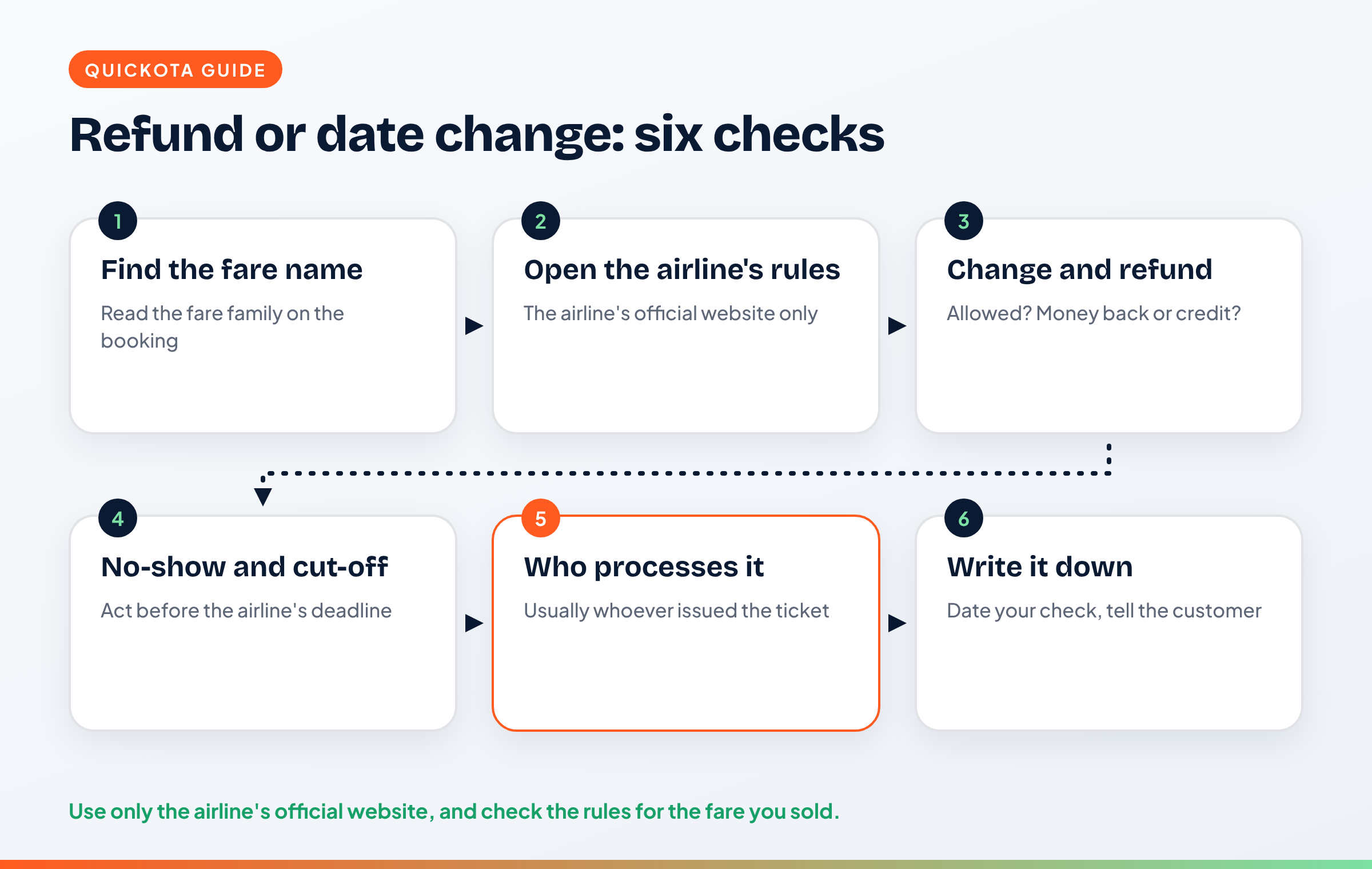
Answer only after you have checked the fare name, the airline's change and refund rules for that fare, the no-show rule, the cut-off time and who processes the request. Then ask your supplier for a quote. A routine of six short steps protects your margin and stops you promising something the airline does not allow.
- Find the fare name. Look at the booking and the fare rules you saw when you sold it. Note the cabin and the fare family or brand name exactly as the airline writes it.
- Open the airline's own rules. Go to the airline's official website and find its published fare rules, fare types or conditions of carriage. Check that the page applies to the fare you sold.
- Check change and refund. Is a date change allowed? Is a refund allowed, and is it money back or a credit for later travel? Are unused taxes mentioned?
- Check the no-show rule and the cut-off. Find the last time before departure when a change or cancellation is still accepted, and what happens after it.
- Confirm who processes it. For an agency ticket, find out whether the request goes through the agency that issued the ticket, your supplier or the airline.
- Write it down. Save the page address and the date you read it, then send the customer a short summary with the supplier's quote.
If the airline's page and the booking's fare rules seem to disagree, ask your supplier before you answer.
Where do you find each airline's own rules?
Use only the airline's official website: flynas.com, flyadeal.com, saudia.com, flydubai.com and egyptair.com. Look for the pages on fare types or fare families, changing or cancelling a booking, refunds and conditions of carriage. Avoid forums, social media posts and old screenshots, because rules change and copies go out of date.
Rules differ by airline and by fare, and airlines update them often, so this guide does not copy them. Here is what to look for on each airline's site:
| Airline | Official website | What to check on the airline's site |
|---|---|---|
| flynas | flynas.com | Fare names, change and refund rules, cut-off, no-show, rules for agency bookings |
| flyadeal | flyadeal.com | Fare names, change and refund rules, cut-off, no-show, rules for agency bookings |
| Saudia | saudia.com | Fare family conditions, change and refund rules, no-show, rules for agency bookings |
| flydubai | flydubai.com | Fare type conditions, change and refund rules, cut-off, rules for agency bookings |
| EgyptAir | egyptair.com | Fare rules on the ticket, refund route for agency tickets, check-in status (see below) |
For the four airlines we could not confirm, we do not repeat rules from other websites. Read the airline's published fare rules for the fare you sold, on the day you need them, because airlines can change these pages at any time.
What does EgyptAir say about refunds on agency tickets?
EgyptAir's online refund page says that passengers whose tickets were issued by travel agents should check the refund process with the same original place of purchase. So for a ticket your agency sold, the request goes back through the seller that issued it, not through EgyptAir's online form.
The same page, read on 7 November 2026, also says:
- The online refund form is for tickets and EMDs issued through EgyptAir sales offices. Tickets bought on EgyptAir's website use a separate automatic refund form.
- Refunds are processed according to the ticket's fare rules and EgyptAir policy. So the fare rules on your booking still decide what the passenger can get back.
- Refunds can be requested within two years from the date of issue, for tickets that are completely unused or partly used.
- If the next flight is within 72 hours, the check-in must be cancelled before the refund is requested.
For an agency, this means: send the request through your own supplier, not EgyptAir's online form, check the fare rules, and make sure any check-in for a flight in the next three days is cancelled first.
Who processes a refund or change for an agency booking?
For a ticket sold through an agency, the refund or change usually goes back through whoever issued the ticket: your consolidator, your B2B platform or your own ticketing office. The airline then applies its rules. Sending the customer straight to the airline often wastes time, because many airline self-service tools cover only tickets bought directly from that airline.
Ask yourself three questions for each booking:
- Who issued the ticket? If your supplier issued it, the request goes to your supplier.
- Where is the money returned? Usually to the party that paid for the ticket. For an agency booking, that is often the agency or its supplier, not the passenger's card.
- Who talks to the customer? You do. Keep them updated, and do not promise a date for money you do not control.
If an airline cancels or retimes a flight, its own published policy sets the passenger's options.
How do cut-off times and no-shows change the answer?
The same ticket can have different options depending on when the customer asks. Many airlines set a cut-off time before departure after which changes or cancellations are no longer accepted, and a missed flight is often treated as a no-show with fewer options. Check the cut-off first, because the clock keeps running while you look.
Practical habits that help:
- Act before the cut-off, even if you are still waiting for the customer's final decision. Ask your supplier what can be done in the time left.
- Treat check-in as a step that matters. On some airlines, an active check-in has to be cancelled before a refund or change can be processed, as EgyptAir states for flights within 72 hours.
- Remind customers that a missed outbound flight can affect the return on many fares. Our fare rules guide explains the no-show rule.
How should you record and explain what you found?
Keep a short note on the booking: the fare name, the airline page you read and when, the cut-off time and the supplier's quote. Then send the customer a plain summary. This protects you in a dispute and speeds up the next case on the same airline.
Illustrative example (no real fares or fees): a customer in Khartoum bought a return ticket from your agency for a family member flying from Jeddah to Cairo, and asks to move the return by a week. You open the booking, note the fare name, read the airline's published change rules for that fare and the cut-off, then request a quote from your supplier. You reply:
"I checked the airline's rules for your fare today. A date change is allowed on your ticket before [cut-off]. The cost is the change fee plus any fare difference, as in the quote below. I can request it as soon as you confirm."
If the change is not allowed, say so plainly and explain what the rules do allow. Our guide to quoting flights on WhatsApp has a full message template.
How to handle refunds and date changes with QuickOTA
QuickOTA is a B2B travel platform. In the QuickOTA B2B Panel you search, hold and ticket flights, and you see the fare rules before you book. For a ticket issued through the panel, you request changes, cancellations and refunds from your panel and see the quote before you accept. These requests are not instant, because each one has to be confirmed.
Service fees are itemised and shown before you book and in your booking details. Approved refunds are credited back to your QuickOTA wallet. You also receive schedule-change notifications for your bookings. QuickOTA works with agencies that do not have IATA accreditation: QuickOTA issues the ticket for your booking. B2B Panel access is free, with no setup fee and no minimum deposit. You are responsible for meeting your own country's rules for selling travel.
Common mistakes with airline refunds and date changes
- Answering from the airline name alone. The fare name on the booking decides the rules.
- Quoting rules from memory or a forum. Use the airline's official website and the fare rules, and note the date you read them.
- Sending the customer to the airline's online form for an agency ticket. The request usually goes back through whoever issued the ticket.
- Missing the cut-off. A request that arrives late can turn a change into a no-show.
- Forgetting an active check-in. It may have to be cancelled before anything else can happen.
- Promising a refund date. You do not control how long the airline and supplier take.
Frequently asked questions
Can my customer request an EgyptAir refund online for a ticket my agency sold?
EgyptAir's online refund page says passengers with tickets issued by travel agents should check the refund process with the original place of purchase. Send the request through your supplier, not EgyptAir's online form, and check the fare rules first.
Where do I find the change and refund rules for flynas, flyadeal, Saudia or flydubai?
On each airline's official website (flynas.com, flyadeal.com, saudia.com, flydubai.com), in its pages on fare types, changing a booking, refunds or conditions of carriage, and in the fare rules shown when you booked. Check them on the day you need them.
Is a refund always paid back as money?
Not always. Depending on the airline and the fare, a cancellation may give money back, a credit for later travel, only some taxes, or nothing. The airline's published rules and the fare rules for that ticket decide.
Who should the customer contact for a refund on a ticket bought from an agency?
The agency that sold it. The agency then sends the request through whoever issued the ticket, receives a quote and keeps the customer updated.
Does QuickOTA process refunds and date changes for bookings made in the panel?
For tickets issued through the QuickOTA B2B Panel, you request changes, cancellations and refunds from your panel and see the quote before you accept. Approved refunds are credited back to your QuickOTA wallet.