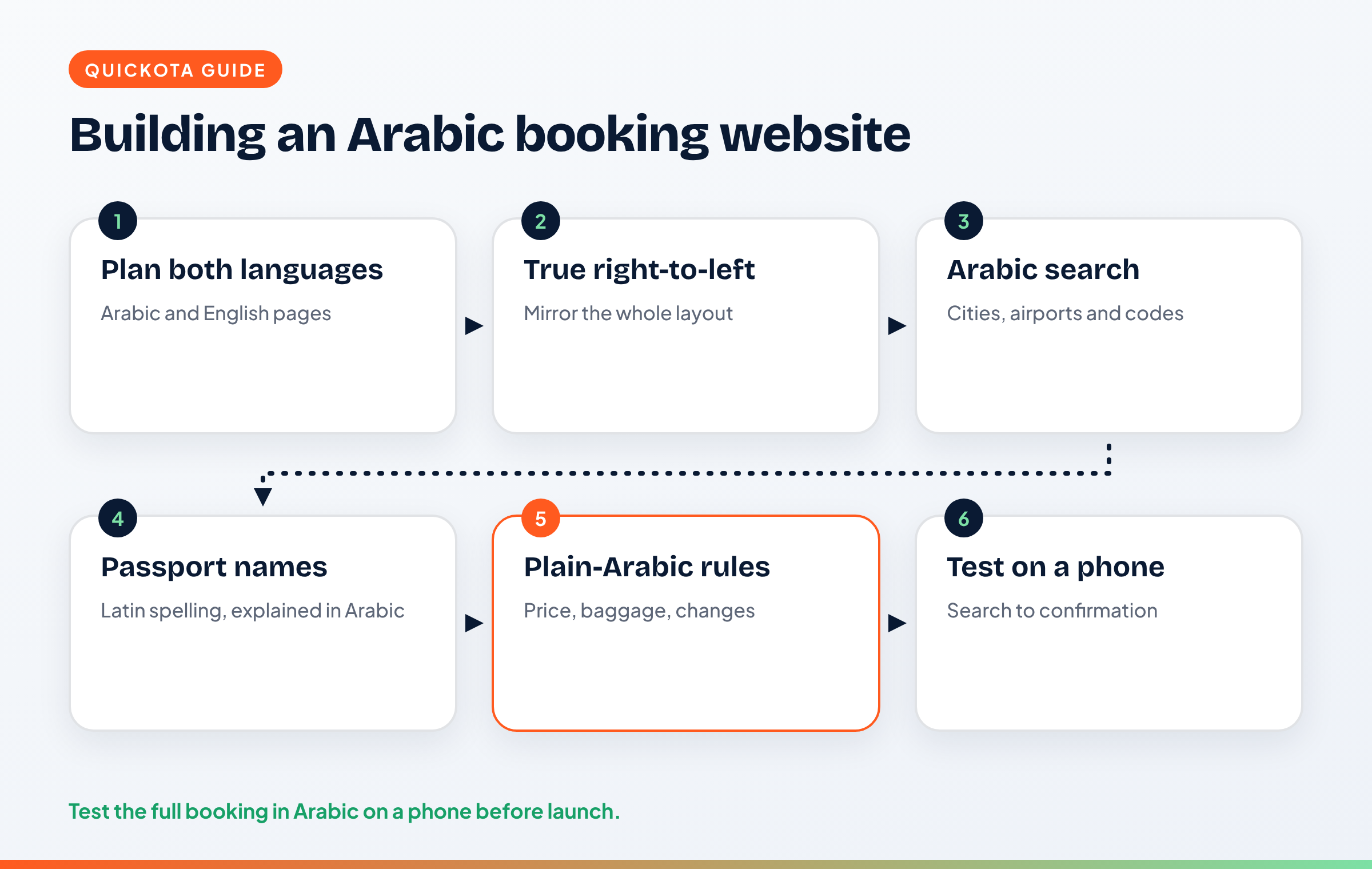
Short answer: A good Arabic travel booking website is more than translated text. It needs a true right-to-left layout, Arabic city and airport search, clear dates and numbers, passenger names in passport spelling, prices and rules written in plain Arabic, and both Arabic and English pages for search. Test every step of the booking on a phone before you launch.
Most travellers in the Gulf, Iraq, Egypt, Sudan and North Africa search and book on their phones, and many prefer Arabic. Yet many agency websites are English-only, or have Arabic added as an afterthought, with broken layouts and mixed-up dates. This guide explains what an Arabic travel booking website needs, from layout and search to names, payments and SEO, with a checklist you can use with any website provider.
Key takeaways
- Right-to-left (RTL) means the whole layout mirrors, not only the text direction.
- Customers search in Arabic and English. Support both spellings of cities and airports.
- Passenger names must still be entered in the Latin spelling printed in the passport.
- Write prices, baggage and fare rules in plain Arabic, and keep English available.
- Publish Arabic and English pages so both sets of searches can find you.
Why does an Arabic booking website matter?
Many customers in the Arab world are more comfortable reading prices, rules and instructions in Arabic, especially families and older travellers. An Arabic site reduces mistakes, builds trust and helps you appear in Arabic searches. A poor Arabic site does the opposite, because broken layouts look unprofessional and confuse people at the payment step.
What does a proper right-to-left layout include?
A proper RTL layout mirrors the whole page: menus, icons, arrows, form fields and step indicators run from right to left, and text aligns to the right. Numbers, flight codes and some English words stay left to right inside Arabic text. A site that only flips the text but not the layout is hard to use.
Check these points: - Navigation: the menu and logo sit on the right; "next" arrows point left. - Forms: labels and fields align to the right; error messages appear in Arabic. - Mixed text: flight numbers, booking references and email addresses display correctly inside Arabic sentences. - Tables: fare comparison and baggage tables read from right to left. - Phone view: the layout works on small screens, where most bookings happen.
How should search work in Arabic?
Customers type cities in Arabic, in English, or as they say them locally. Search should find "جدة", "Jeddah" and the airport code alike. Dates should be clear and unambiguous, and results should show Arabic city names with the airport code so customers know exactly where they are flying.
- Support Arabic and English names for cities and airports, plus common alternative spellings.
- Show the airport code next to the city name.
- Use a clear date format with the month written out, so "3/4" is never confusing.
- Consider showing Hijri dates as extra information for Umrah and Hajj seasons, while bookings use the airline's Gregorian dates.
- Keep times in the local time of each airport, as airlines do.
How do you handle passenger names?
Even on an Arabic website, passenger names must be entered exactly as printed in the passport's Latin characters, because that is what airlines require. Make this clear on the form in Arabic, with an example. Many booking problems in the region start with names typed in Arabic or spelled differently from the passport.
- Label the fields "Surname as in passport" and "Given names as in passport", in Arabic.
- Accept only Latin letters in name fields and explain why.
- Ask customers to check names before payment.
- Collect dates of birth to set child and infant fares correctly.
Our guide to common booking mistakes explains why exact names matter.
How should prices, baggage and rules be written?
Write the total price, the baggage allowance and the change and refund rules in plain Arabic, close to the price. Customers must understand what they are buying before they pay. Avoid machine-translated fare rules: summarise the key points in simple Arabic and keep the full airline rules available.
- Show the total price, with service fees itemised.
- Write the checked and cabin baggage for each flight.
- Summarise change and refund rules in two or three short lines.
- Keep the currency clear and consistent.
How do Arabic pages help SEO and AI search?
Customers search in both Arabic and English, so publish both. Each language should have its own pages with proper titles and descriptions, not one page mixing both. Content written for Arabic readers, such as Umrah planning or summer family trips, helps search engines and AI assistants understand who you serve.
- Give each Arabic page an Arabic title, description and headings.
- Link the Arabic and English versions of each page to each other.
- Write original Arabic content rather than word-for-word translation.
- Keep business facts, contact details and services identical in both languages.
Our guide to getting recommended by AI assistants explains how clear, consistent content helps.
A launch checklist for an Arabic booking website
Before launch, test the full journey in Arabic on a phone: search, results, passenger details, payment and confirmation. Ask two or three customers to try it and watch where they hesitate. Fix layout, wording and name-field problems before you promote the site.
- Search in Arabic and English for your top routes.
- Book a test trip on a phone in Arabic.
- Check passenger name fields and their instructions.
- Read every price, baggage and rule message in Arabic.
- Check confirmation emails and messages in Arabic.
- Check Arabic page titles and descriptions.
How QuickOTA white-label websites support Arabic
QuickOTA is a SaaS B2B travel platform. Agencies book flights, visas and group requests in the B2B Panel, which is free. Agencies that want their own branded site can use a QuickOTA white-label website, with their own logo, name, colours and domain, and their own payment gateway.
The Multi-Language add-on runs your site in several languages, including right-to-left layouts such as Arabic. It can be added on the Standard plan and is included in Premium. Standard and Premium also include a website builder, a blog and SEO tools. You manage your B2B Panel and your white-label website from one account, with no setup fee. Send a request and we will reply with plan details.
Common mistakes with Arabic travel websites
- Flipping text but not the layout, so arrows, forms and tables run the wrong way.
- Arabic name fields that let customers type names that do not match their passports.
- Machine-translated fare rules that confuse more than they help.
- Ambiguous dates such as 3/4.
- One page mixing Arabic and English instead of a page for each language.
- Never testing on a phone before launch.
Frequently asked questions
Is Arabic translation enough for an Arabic website?
No. The layout must also mirror for right-to-left reading, and search, dates, forms and messages must work in Arabic. Translation is only one part.
Should passenger names be entered in Arabic?
No. Airlines need names exactly as printed in the passport's Latin characters. Explain this in Arabic on the form.
Do I need both Arabic and English pages?
Usually yes. Customers search in both languages, and many Gulf residents prefer English. Keep the facts identical in both versions.
Should I show Hijri dates?
They can help as extra information during Umrah and Ramadan seasons, but bookings and tickets use the airline's Gregorian dates. Always show the Gregorian date clearly.
Can a QuickOTA white-label website run in Arabic?
Yes. The Multi-Language add-on runs the site in several languages, including right-to-left layouts. It can be added on Standard and is included in Premium.
How do I test my Arabic site before launch?
Book a full test trip in Arabic on a phone, from search to confirmation, and ask a few customers to try it while you watch.