Short answer: Booking on a friend's B2B portal login works until something goes wrong. Then the money sits in their wallet, the bookings sit in their history, and your customers' passport details sit in their account. Your own account puts your bookings, payments and records under your name. To open one with QuickOTA you need a registered company or a valid travel agency (tourism) licence from your country.
This guide is for freelance and home-based agents who sell flights to their own customers but book them on someone else's agency account. It explains what the shared set-up really means, the risks for you and for the account owner, and how to move to an account of your own. It does not give legal advice for any country.
Key takeaways
- On a shared login, the account owner holds the wallet, the booking history and the customer data, not you.
- The owner carries the risk too: every booking, refund and dispute is in their name.
- Supplier accounts are usually opened for one business, and the supplier's terms say who may use them.
- To open a QuickOTA account you need a registered company or a valid travel agency (tourism) licence from your country.
- Check your own country's rules for selling travel before you apply, and plan a clean exit from the shared set-up.
What does booking on someone else's login mean?
It means you sell to your own customers, but you search, hold and ticket on an account opened for another agency, often a friend or relative. You use their username, and you usually pay them so they can pay their supplier. To the supplier, every booking is theirs. You are not on the account, even though you made the sale.
A typical set-up, described here as an illustrative example, looks like this. A freelancer in Dubai has customers who fly to Cairo, Khartoum and South Asia. A friend runs a small agency with a B2B portal account. The freelancer logs in with the friend's details, holds a fare, sends the quote on WhatsApp, collects the money and transfers it to the friend. The friend tops up their wallet and the ticket is issued.
The same pattern appears in Cairo, Baghdad, Algiers and many other cities. It often starts as a favour and grows into most of the freelancer's business, without anyone writing down who is responsible for what.
What are the risks for the freelancer?
On a shared login you own the customer relationship but none of the records. The wallet, the booking history, refunds and the supplier relationship all belong to the account owner. If the friendship cools, the owner's business closes or the supplier suspends the account, you can lose access to your own customers' bookings overnight.
The main risks, one by one:
- No wallet of your own. Your customers' money goes through your account, then the owner's, then the supplier's. Each step is a chance for delay or a mistake, and you cannot see the balance your bookings are paid from. Our guide to prepaid wallets and credit explains how B2B payments usually work.
- No booking history of your own. Your past bookings sit in someone else's list. When a customer comes back for a date change or wants last year's itinerary, you have to ask the owner for it.
- Refunds go to the owner. A refund for your customer is usually credited to the account that paid, which is not yours. You then rely on the owner to pass it on.
- You cannot act alone after ticketing. Schedule changes, date changes and refund requests go through the account. If the owner is travelling or busy, your customer waits.
- No proof of your trading record. When you later apply for your own supplier account, you cannot show bookings made under another name as your own history.
- Your prices are not fully yours. The owner may add their own margin, change the account's settings or see what you charge.
What are the risks for the account owner?
The owner carries risks they may not have thought about. Every booking on their account is legally and commercially theirs as far as the supplier is concerned. They hold the customer data of travellers they have never met, answer for mistakes they did not make, and may be breaking the terms of use of their own supplier account.
What the owner takes on:
- Accountability. If a name is wrong, a hold expires or a ticket is issued by mistake, the supplier deals with the account holder. The owner cannot easily say "that was my friend".
- Money. The owner's wallet pays for tickets the freelancer sold. If a customer's payment fails or a bank transfer is reversed, the owner may be the one who is out of pocket.
- Customer data. Passport photos, names, dates of birth and phone numbers end up in the owner's account and chat history. The owner becomes responsible for data they did not collect.
- Disputes. When a customer complains about a change fee or a refund, both people may say the other promised something. Without a written agreement, nobody knows who should pay.
- Terms of use. Supplier accounts are usually opened for one business, and the supplier's terms say who may use the login. Sharing it with another business may break those terms, and the supplier can restrict or close the account. The owner should read their own supplier's terms; we cannot say what any particular supplier allows.
None of this means the owner or the freelancer is acting in bad faith. It means the set-up puts real risk on both people with nothing written down.
Shared login or your own account: what changes?
With your own account, the records follow the business that made the sale. Your wallet pays for your bookings, your booking list shows your history, refunds come back to you, and the supplier knows who to contact. The table below compares the two set-ups in general terms; details depend on the supplier.
| Shared login | Your own account | |
|---|---|---|
| Who the supplier sees | The account owner | You |
| Wallet and payments | Owner's wallet; you pay the owner | Your wallet; you pay the supplier |
| Booking history | In the owner's list | In your list |
| Refunds | Usually credited to the owner's account | Credited to your account |
| Changes and support | Through the owner | You request them yourself |
| Customer data | Held in the owner's account | Held in your account |
| If the arrangement ends | You may lose access to records | Your records stay with you |
Illustrative example: a freelancer in Cairo sells a return flight to a family travelling to Jeddah for Umrah. The airline changes the return schedule. On a shared login, the change notice reaches the owner, who is away for the weekend. On an own account, the freelancer sees the booking, contacts the customer and requests the change the same day.
Who can open their own B2B account?
It depends on the supplier, and many open accounts only for registered travel businesses. QuickOTA's rule is that you need a registered company or a valid travel agency (tourism) licence from your country. If you work as an individual without either, QuickOTA cannot open an account for you yet.
For a freelancer, that usually leaves two routes:
- Register your own business. Find out what your own country requires to sell travel, whether that is a company registration, a tourism licence or both, and complete it. Rules differ widely by country, so check with the official authority where you are based. We do not give country-specific legal advice. Our guide do you need a licence to sell flight tickets? explains the questions to ask.
- Work under a licensed agency on a written agreement. Some freelancers work formally with a registered agency or a host agency, as their country's rules allow. The agreement says who books, who pays, who holds customer data and who handles complaints. Bookings are made the way that agency's supplier allows, not by sharing a password. See host agency or B2B travel portal? for how these arrangements usually work.
Many freelancers start on the second route and apply for their own account once their business is registered. Our guide how to open a B2B travel agent account covers what suppliers usually ask for and which terms to read.
How do you move from a shared login to your own account?
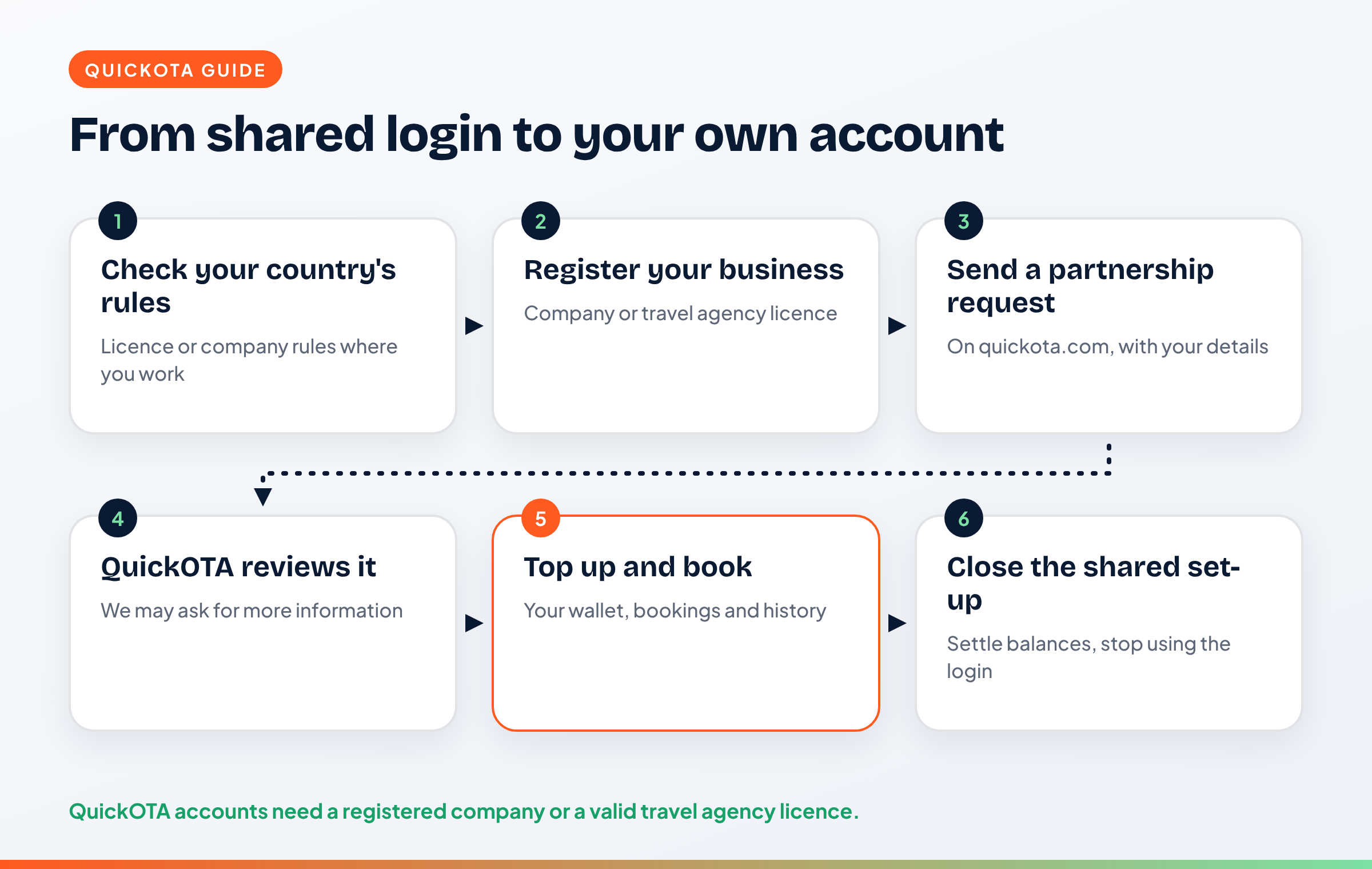
Move in a planned way, not overnight. Check your country's rules, register your business, apply for your own account and, once it is open, book new sales there. Finish or hand over the bookings already on the shared account, settle any money between you and the owner in writing, and stop using their login.
A simple order of work:
- Check your own country's rules for selling travel, and what registration you need.
- Register your business as a company or with a travel agency (tourism) licence, as those rules require.
- Apply for your own account with complete details that match your registration.
- Answer the supplier's questions during the review.
- Top up your own wallet and make new bookings there. Keep old bookings on the shared account until they have flown or been closed.
- Close the shared set-up properly. Agree in writing how open refunds and balances will be settled, collect your customers' itineraries, and ask the owner to change their password so the login is no longer shared.
Tell your regular customers that you now book under your own business name. It is also a good moment to tidy up how you quote; our WhatsApp quote guide has a template.
How to get your own account with QuickOTA
QuickOTA is a B2B travel platform. To open an agency account you need a registered company or a valid travel agency (tourism) licence from your country. Send a request, we review it (and ask for anything else we need), then we open your panel. Top up your wallet and start booking. B2B Panel access is free, there is no setup fee and there is no minimum deposit.
In the QuickOTA B2B Panel you search, hold and ticket flights. Your bookings appear under My Bookings, and your prepaid wallet has a transaction ledger, so you can see what each booking cost. You request changes, cancellations and refunds from your panel and see the quote before you accept. Approved refunds are credited back to your QuickOTA wallet. Service fees are itemised and shown before you book and in your booking details.
QuickOTA does not require IATA accreditation: QuickOTA issues the ticket for your booking. You are responsible for meeting your own country's rules for selling travel.
Common mistakes when leaving a shared login
- Applying before the business is registered. QuickOTA needs a registered company or a valid travel agency (tourism) licence from your country.
- Using details that do not match the registration. Apply with the same business name and contact details as your documents.
- Stopping overnight. Leave open bookings on the shared account until they have flown or been closed.
- Leaving money unsettled. Write down which refunds and balances the owner will pass on, and when.
- Forgetting customer data. Collect your customers' itineraries, and ask the owner to delete passport copies they no longer need.
- Moving to another shared login. A new friend's account has the same risks as the old one.
Frequently asked questions
Can a freelance travel agent open a QuickOTA account?
Only with a registered company or a valid travel agency (tourism) licence from their country. QuickOTA cannot open an account for an individual without one of these. Many freelancers register a business first, or work under a licensed agency on a written agreement, then apply.
Is it wrong to book on a friend's agency login?
We cannot speak for any supplier. Supplier accounts are usually opened for one business, and the supplier's terms of use say who may use the login. The account owner should check their own terms. Even where it is allowed, both people carry risks around money, records and disputes.
Do I need both a company and a licence for QuickOTA?
No. QuickOTA asks for one official registration from your country: a registered company or a valid travel agency (tourism) licence. Your own country's rules for selling travel may require more, so check them separately.
What happens to bookings I made on the shared account?
They stay on that account. Changes and refunds for them still go through the owner. Leave them there until they have flown or been closed, and agree in writing how any refunds will reach you.
Do I need a deposit to open my own QuickOTA account?
No. B2B Panel access is free and there is no minimum deposit. You top up your wallet with the amount you need for the booking you want to make.
Can I keep working with my friend's agency after I have my own account?
Yes, as two separate businesses. You might still pass each other work, but each of you books on your own account and keeps your own records.